import csv
from pathlib import Path
from hwpapi import App


def mail_merge(template: Path, data: Path, output_dir: Path):
    output_dir.mkdir(parents=True, exist_ok=True)

    with App(is_visible=False) as app:
        app.open(str(template))

        with open(data, newline="", encoding="utf-8-sig") as f:
            reader = csv.DictReader(f)
            for i, row in enumerate(reader, 1):
                for name, value in row.items():
                    if name in app.doc.fields:
                        app.doc.fields[name] = value

                out = output_dir / f"letter-{i:03d}.pdf"
                app.save_as(str(out))
                print(f"[{i}] wrote {out}")


if __name__ == "__main__":
    mail_merge(
        template=Path("templates/letter.hwp"),
        data=Path("data/recipients.csv"),
        output_dir=Path("out"),
)Mail merge
Template + CSV → N output files
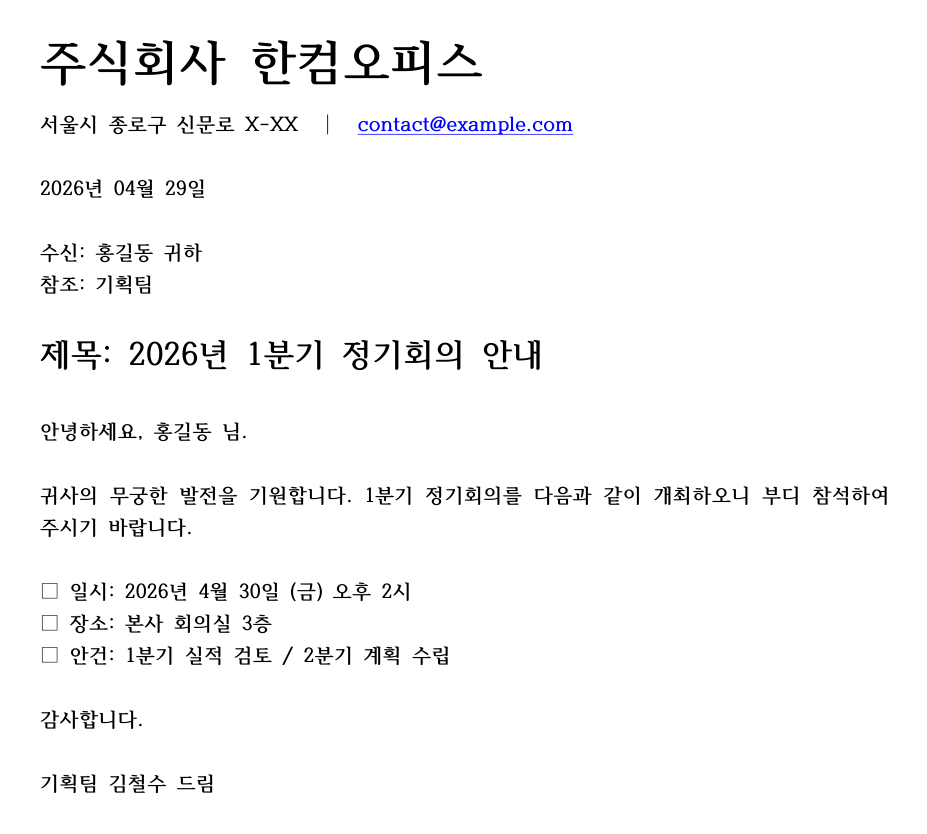
tests/generate_v2_doc_artifacts.py running real HWPPorted from nbs/01_tutorials/09_usecase_mail_merge.ipynb, rewritten against the v2 collection API.
The shape
- Open a template
.hwpfile with named fields (누름틀). - Iterate rows of a data source (CSV, list of dicts, database query).
- Assign each column to the corresponding field.
- Save-as a per-row output file (
.hwpor.pdf).
Minimal implementation
Sample CSV
id,name,title,date
001,홍길동,사원,2026-04-19
002,김영희,대리,2026-04-19
003,이철수,과장,2026-04-20
The template must have fields named id, name, title, date — hwpapi silently skips fields that aren’t in the template.
Skip invalid rows
required = {"name", "date"}

for i, row in enumerate(reader, 1):
    missing = required - set(k for k, v in row.items() if v)
    if missing:
        print(f"[skip row {i}] missing: {missing}")
        continue
# ... normal mergeExport as PDF vs. HWP
The extension on save_as(path) decides the format:
save_as("letter.hwp")— native HWPsave_as("letter.pdf")— PDF export (uses HWP’s built-in exporter)save_as("letter.docx")— Word export (if HWP has the converter installed)
For finer-grained control (resolution, page range), see hwpapi.io.export_pdf.
See also
- Recipe: fill-fields — the building block
- Reference: collections/fields