from hwpapi import App

rows = [
    {"name": "홍길동", "dept": "R&D", "score": 91},
    {"name": "김영희", "dept": "Sales", "score": 88},
    {"name": "이철수", "dept": "R&D", "score": 95},
]

with App() as app:
    app.new()

    # Insert a table: (rows + header, cols)
    cols = list(rows[0].keys())
    app.doc.tables.add(rows=len(rows) + 1, cols=len(cols))

    tbl = app.doc.tables[-1]   # the just-inserted table

    # Header row
    for c, name in enumerate(cols):
        tbl.cell(0, c).text = name

    # Data rows
    for r, row in enumerate(rows, start=1):
        for c, key in enumerate(cols):
            tbl.cell(r, c).text = str(row[key])

app.save_as("report.hwp")Data to table
DataFrame / list-of-dicts → HWP table
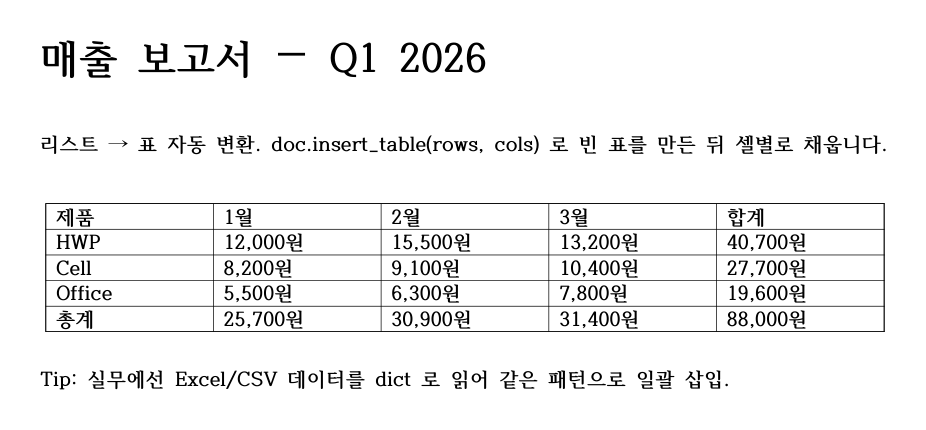
tests/generate_v2_doc_artifacts.py running real HWPPorted from nbs/01_tutorials/06_usecase_data_to_table.ipynb.
1. From a list of dicts
2. From a pandas DataFrame
import pandas as pd
from hwpapi import App

df = pd.DataFrame({
    "name": ["홍길동", "김영희", "이철수"],
    "dept": ["R&D", "Sales", "R&D"],
    "score": [91, 88, 95],
})

with App() as app:
    app.new()
    rows, cols = df.shape
    app.doc.tables.add(rows=rows + 1, cols=cols)

    tbl = app.doc.tables[-1]

    for c, name in enumerate(df.columns):
        tbl.cell(0, c).text = str(name)

    for r, row in enumerate(df.itertuples(index=False), start=1):
        for c, value in enumerate(row):
            tbl.cell(r, c).text = str(value)

    app.save_as("report.hwp")
3. Format the header row
from hwpapi import App
from hwpapi.low.parametersets import CharShape

with App() as app:
    # ... (insert table as above)

    header_shape = CharShape(Bold=True, TextColor="#FFFFFF")
    header_fill = "#1F4E79"

    for c in range(tbl.cols):
        cell = tbl.cell(0, c)
        cell.text = cols[c]
        cell.fill = header_fill
        # Per-cell charshape isn't always exposed; fall back to selection:
        cell.goto()
        app.doc.select_all_in_cell()   # if your version exposes this
        app.actions.CharShape.pset = header_shape
        app.actions.CharShape.run()
4. Round-trip: read a table back
from hwpapi import App

with App() as app:
    app.open("report.hwp")

    tbl = app.doc.tables[0]
    data = [
        [tbl.cell(r, c).text for c in range(tbl.cols)]
        for r in range(tbl.rows)
    ]

    header, *rows = data
    print("columns:", header)
    for row in rows:
        print(dict(zip(header, row)))
See also
- Reference: TableCollection
- Recipe: report-generation — tables inside a larger document